
You can’t open Song Lab until I’ve let you in, so it’s only fair you get to see what’s in there first. Here’s what it is, and how you’d write a song in it.
“I Already Started Writing to Them”
Back when I mailed beat CDs to artists, a couple of weeks would go by and then somebody would hit me back with some version of the same sentence: “I already started writing to them.” (I told that whole story here.)
That simple sentence is still the measure I use to know if a beat is a good fit: if the beat doesn’t make you write, it’s the wrong beat. Now, the preview you hear as a guest is just 25 seconds. Long enough to know a beat is calling you but not long enough to get into a flow. You find that out with time and writing.
Why I Built It
What I built in Song Lab is actually how I write. It was modeled after that. I get the concept of the song, then each section has to support the concept to tell the story. Sometimes I may write a line or two as I hear them, but this is typically what I do at the beginning. Before building this tool, if I was at my desk, I’d load the beat up in Maschine or LUNA Studio and do this same process manually, typically with Notes (I’m on a Mac) open to the side. Then I just write as I loop through the sections. If on my mobile, I actually use the djay app to play the beat and write using the same Notes app. The process works, but it has a lot of manual parts to it.
As I’ve been building out my site though, I’m like why not use the player already on my site and make this a feature for other artists to use? So I built a player (thank you, Claude) that loops a section, and that turned into Song Lab. Every beat for sale has one, and the tile under the cover on the beat page, the one that says Write to this beat, takes you there. It’s for writing lyrics. Nothing in there records audio, so when the words are done you still need to get to the studio and record the vocals.
How You’d Write a Song in It
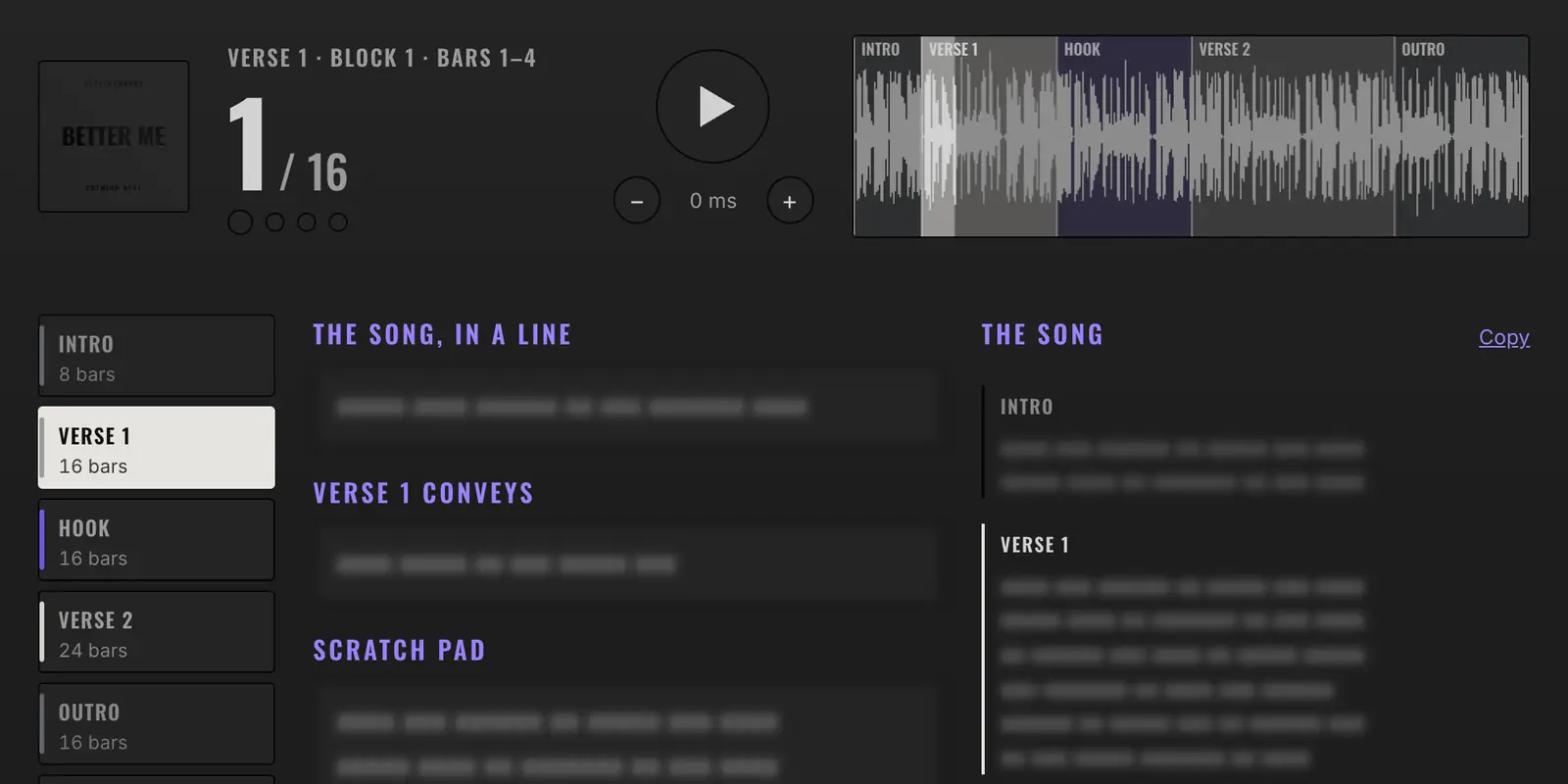
I’ll use Better Me, since it’s the beat I tested the loop on. It’s Alt R&B at 114 BPM, with an 8-bar intro, a 16-bar first verse, a 16-bar hook, a 24-bar second verse and a 16-bar outro.
The first time you open a beat, before anything plays, a notice tells you the beat isn’t yours yet. Your access lets you write to it. If someone else licenses it first, it comes out of the catalog and stops playing for you. The same notice says nothing in Song Lab guarantees a song’s success. You press I understand, once per beat, and the page opens.
Say What the Song Is
Up top there’s a field called The song, in a line. That’s your concept, and it gets one line. It’s to help keep you focused. Then you pick a section. They’re laid out by name with their bar counts, straight from the beat’s arrangement, and each one has its own line for what that section should convey. So before you’ve written a lyric, Verse 1 has a job and Verse 2 has a different one. Of course you can skip all of that and go straight to the words (it’s your song). I’m just telling you how I do it.
Loop the Part You’re Writing
Tap Verse 1 and press play, and those 16 bars loop. The loop is sample-accurate, which means the end lands exactly on the start with no gap. There’s a bar counter, and the beat is drawn across the page with your loop lit up. You can literally sit there for 20 minutes and loop it as you write.
As your song takes shape, you’ll find yourself working parts of a section, so I added the ability to cut a section into blocks, from 2 bars up to 8, and step through them with the arrows. On Better Me, a 4-bar block comes back around about every eight and a half seconds. Move to the next block and the loop waits for the next bar line, so the music doesn’t stumble. The page places those bar lines from the BPM, and if it’s a few milliseconds off the record there’s a nudge for that. (Math only gets you so close.)
Write While It Plays
The scratch pad is where the words go. Whatever you write there shows up in a column called The song, section by section, so you watch the whole song fill in while you work on one part of it. It saves itself a moment after you stop typing. On a phone everything stacks into one column, and once the player scrolls away a slim bar with play and the arrows stays under the header, so you aren’t scrolling back up every time you want the beat to stop.
Hear It in Your Voice
There’s also a tape deck on the page, the same 4-track that’s in BEAT TAPES. You can slide the tempo 7 BPM either way and the pitch 3 semitones either way, and they move separately. So Better Me can run anywhere from 107 to 121 BPM and hold its key, or drop a semitone and hold its tempo. If your voice sits better at 110, you’ll know before you’ve asked me for anything. Know that tailoring comes with the license, and I make those changes from the original session. You can also send me your setting from the page with a note.
Note: the Tape Deck feature is for auditioning only. Moving the sliders gives you no rights to the beat nor producer credits. lol.
Your Words and the Beat
Your Words
Your lyrics stay private. They’re encrypted and shown only to you. FWIW I can see the number of words typed (and to which song) and when you last saved, so minimally I know a song is taking shape.
The Copy button puts the song on your clipboard as plain text, with the beat, your song line, what each section conveys and the lyrics, and you paste it wherever you keep your songs. If you click a link to leave with words you haven’t copied, the page asks if you want a copy first. Browsers don’t let me ask when you close the tab or hit back, so you’re on your own there (it’s still saved).
If Someone Else Licenses It First
Now the blunt part. You’re writing to a beat you haven’t licensed, and every beat I sell is sold once, to one artist. If another artist licenses Better Me while you’re on your second verse, it comes out of the catalog and it stops playing for you. The page stays open and you can still change your words or copy them out. You keep what you wrote, but the beat is gone. So, you can choose to sleep on it, but just know this could happen. You also have to know that I am a writer as well, so the same rule applies to me too.
How to Get In
Song Lab is free with access to my private catalog (and I have more features planned for it), but it takes a ‘yes’ from me because this is my private platform. It doesn’t cost anything to ask, and I read every request myself. Request access.
Discover more from Beats By Moody
Subscribe to get the latest posts sent to your email.