
I used to mail beat CDs to artists and then we would talk on the phone. This experience has largely been lost with the beat store and streaming, but I wanted to bring it back. So I built Beat Tapes, an active listening experience for your phone.
Moody, track 2 and 4 is crazy
Before streaming, if you wanted beats from me, you got a CD. I’d burn beat snippets on a CD (as much as I could fit on there), mail it out, and wait. A couple of weeks later, you’d hit me back. “Moody, track 2 and 4 is crazy. Can you send these to me ASAP? I already started writing to them.” For me, this worked great and it is how I got a lot of my placements. Also, the back and forth was part of the relationship. I made the music, you listened and told me what moved you, and then we made it happen. Somewhere in between we’d talk about life and family too so we had confirmation on alignment and values (important).
Then SoundCloud showed up and it made distribution a lot more convenient. I could send a link to a playlist instead of burning a disc, and I could stop burning CDs just to hear my own beats in the car (which did get annoying). It worked for shopping beats, but as a whole, not as well, and I think I know why.
People get distracted
All of us get distracted. A CD playing in your car has your attention for the whole drive. That’s active listening even with your hands on the wheel, because there’s nowhere else to go and nothing else competing for your ears. A beat playing in a browser tab doesn’t hold you the same way, which is why you sometimes can’t find the tab that’s making the sound. You moved on somewhere along the way.
That’s the difference between active and passive listening, and the medium decides which one you get. Putting a record on is active. You have to get up to change it, and skipping a song is a whole production. Streaming that same record while you do three other things around the house is passive. It matters for an artist because writing takes focus, and focus is the first thing to go when you’re only half there.
Then beat stores rewired it further. You could argue there’s still active listening happening in a beat store, and sometimes there is. But something else got in front of it. Beats became thumbnails.
Your ears used to hear a beat and paint the picture. Now your eyes go first, and eyes can’t hear. They pick anyway, because something has to, so whatever catches your eye is what gets played. Ever wonder why so many of those thumbnails have half-naked women on them? Skin gets attention, attention sells, and when you’ve got two seconds to hook somebody, that’s the cheapest way to buy most people.
I knew I wanted something else. So, I’ve been in the lab working on an experience I think artists will appreciate. I originally started with a couple of 3D browser-based games, and while they invoked more the active listening experience, I personally just did not like them — just speaking as an artist myself. And then it hit me — with the recent wave of nostalgia being pushed by Gen Z (thank you Gen Z), it triggered the memory of the beat CDs I used to send out, and so that is how I landed on Beat Tapes.
What Beat Tapes Is
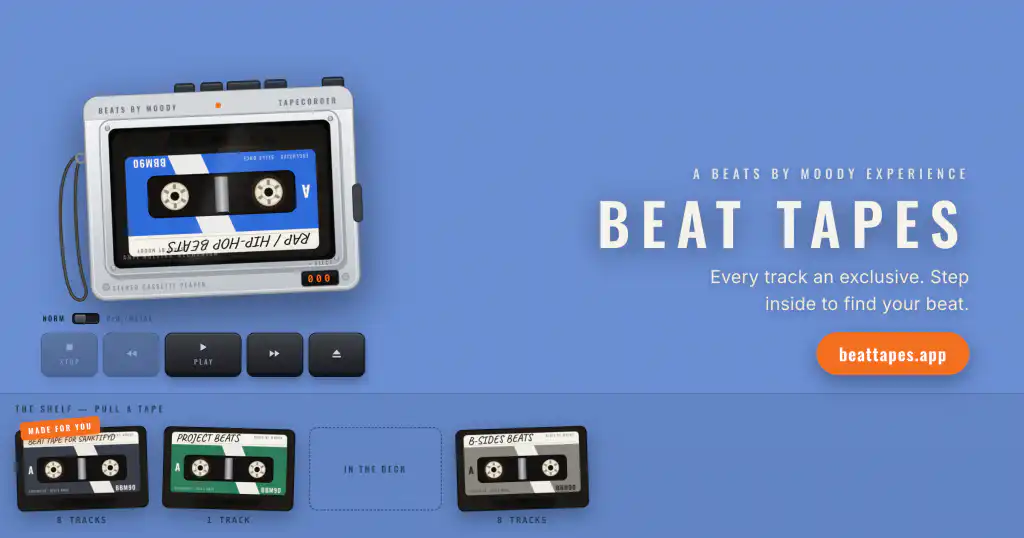
Beat Tapes rebuilds the beat tape for today and puts active listening back at the center of it. I modeled the whole thing on what I used to do with beat CDs. You install it straight from your browser on iOS or Android, no app store involved. It runs in a desktop browser too, though this is designed with mobile at the forefront.
How Beat Tape Works

There’s a shelf of cassettes along with a portable tape player. The tapes are the genres. Alt R&B Beats, Rap/Hip-Hop Beats, Trap Beats, and R&B Beats. I even have a B-Side Beats tape that catches other types like Afropop since I currently don’t have enough of those to warrant its own tape. (I’m working on adding more though!)
All you do is drag a tape off the shelf, drop it in the player, let the tape auto-rewind, and hit play.
The Wait is by Design
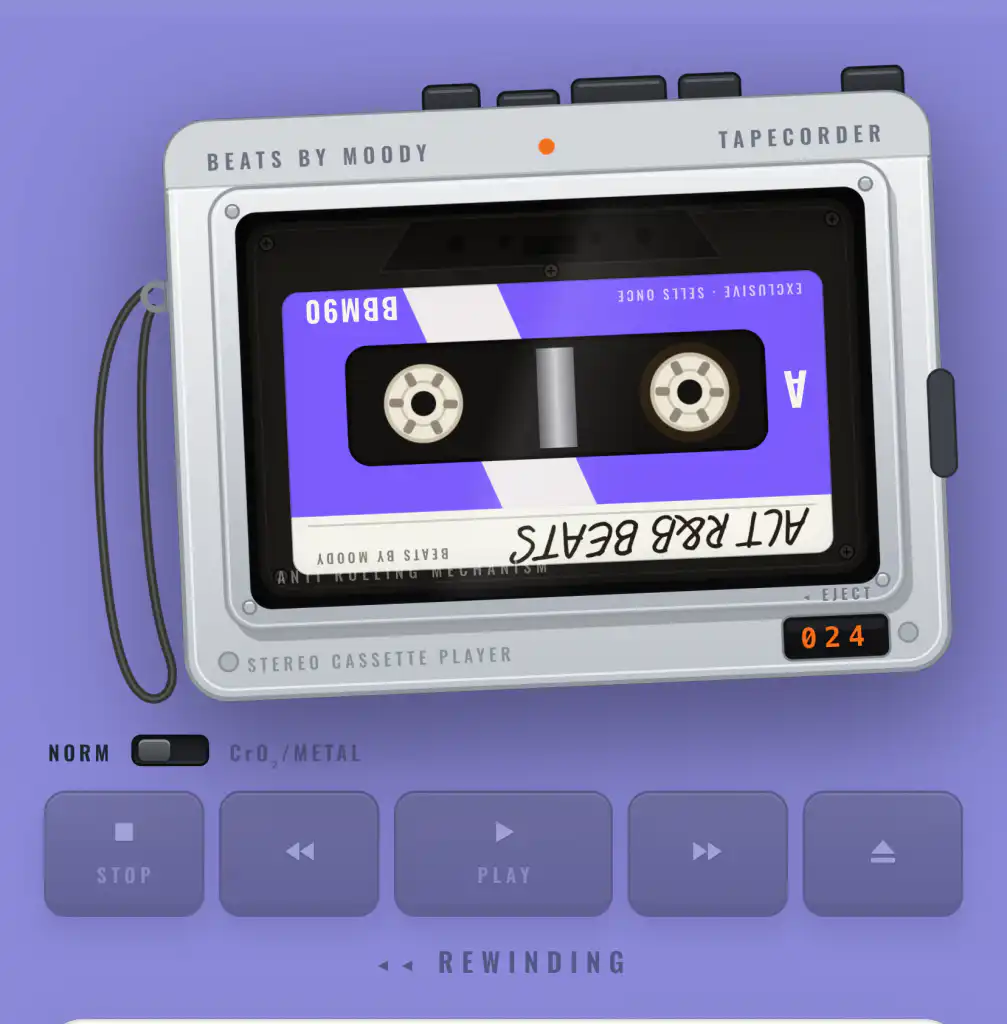
Someone’s going to ask what makes this different from a SoundCloud playlist. Fair question, and the answer is the same thing this whole piece has been about. A playlist is a passive experience. Nothing about it asks you to slow down. Beat Tapes asks, on purpose.
Take skipping. Tap a different track and the player doesn’t jump to it — it winds. The reels spin up, the counter races, and you hear tape moving at speed until it lands. The further down the tape you’re headed, the longer the wind, up to about three seconds. I could have made that instant. Instant is easy. But three seconds is enough to make you think about whether you actually want to skip. Otherwise, just sit back with the beat and your ears do the work they’re built for. Thumb through forty beats in two minutes and you’ll remember none of them.
There’s also a NORM and CrO₂ switch on the player, and I put it there because I could. I remember flipping that switch as a teenager just to hear the difference. So, why not. None of it is necessary. It’s there because the deck should feel like something you’re operating, and if you grew up with a tape player it’ll get a smile out of you. If you didn’t, now you know what we were doing over here.
The Back and Forth is Welcomed
From any track you can message me about it directly. You’re listening to something, you have a thought, you send me the thought. It’s like calling me at some random hour and leaving a voicemail. It comes straight to me, and when I answer, the reply is waiting for you on beatsbymoody.com.
Favorite a track and it saves straight to your project on beatsbymoody.com. Your saved beats show up on the shelf as your own tape called PROJECT BEATS. Same list either place.
Your Custom Beat Tape
I put together a beat tape for you myself, but not until I know something about you. That’s what makes it worth doing.
When you sign up I ask you a few questions. Your artist name, your Apple Music or Spotify link if you’ve got music out, and a box where you tell me in your own words what you’re looking for. These matter more than what people may expect. I read it, I listen to your music, and then I go pick tracks I think fit you. You’ll get an email when the tape is ready.
This is the part that’s closest to the CDs. Same work, same reason for doing it. The only thing that’s changed is that I don’t have to burn it and mail it.
The Mixer
This is the feature I like the most.
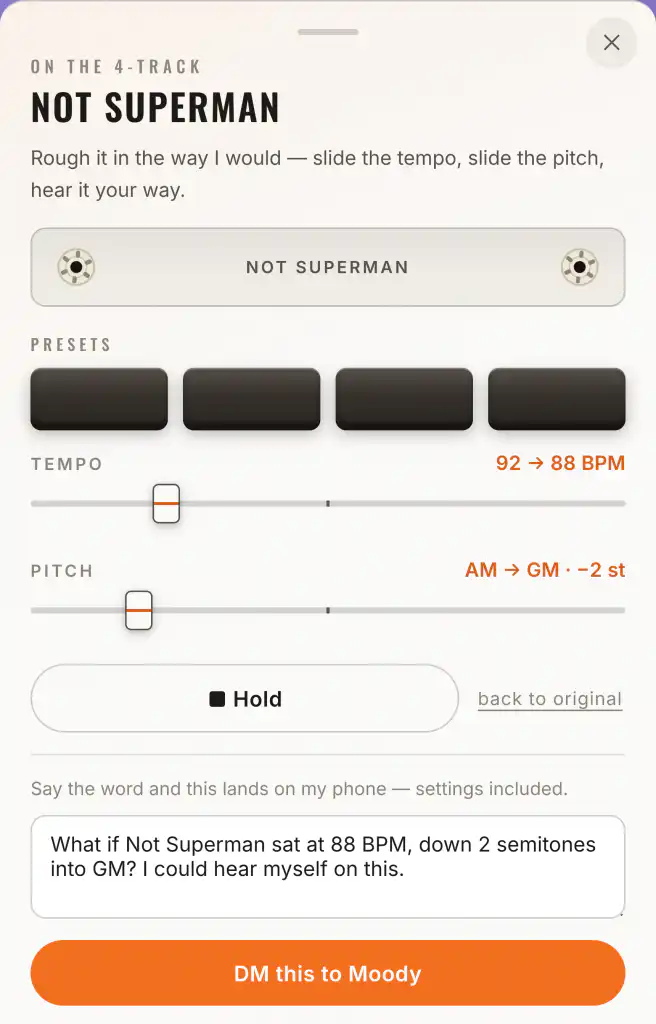
On my site I say I tailor beats for independent artists. Here’s what that actually means. I picked a BPM and a key when I made the beat, but that is what I was hearing when I composed it. Sometimes it needs to move to meet you where you are. Since I composed the music myself, changing it is easy. I pull the session back up, make the adjustments, and save you fresh stems.
What I wanted was for you to hear it first. No point asking me to drop something four BPM if you don’t know yet whether that’s the version you want.
Be Rewarded with a Free Mix
The tapes hold 60-second snippets, same as the CDs, where you only had so much room to work with. Play one for thirty seconds with the track open and the sound actually playing, and it logs. Not thirty seconds sitting in a background tab while you do something else. Thirty seconds of you being there.
That’s my ask in this joint venture. Your time. It’s the same active listening a real tape forced on you, except back then all it got you was the music. Now it earns you a free mix from me.
Here’s how. Save three beats to your project, listen to twenty-five different snippets for at least thirty seconds each, and go play five full beats on beatsbymoody.com.
Do those and you’ve got a mix credit. (You can always see your progress on your Welcome screen). Buy a beat, record your vocals, send me the raw files, and I’ll mix and master the song for you.
How to Get Started
Go to the website BeatTapes.app on your phone. If you arrive on your desktop, you’ll get a QR code to open it on your device instead.
First time through, you’ll create a login. Social account or a password, your call. Fill out your profile while you’re in there, because that’s what I read when I put your personal tape together. Then it drops you at the app home screen.
Install it to your home screen while you’re at it. On an iPhone, open the site in Safari, tap the share button at the bottom, scroll down and tap Add to Home Screen. On Android, Chrome usually offers to install it on its own, and if it doesn’t, hit the three dots in the corner and pick Install app. Either way you end up with an icon like any other app, no app store involved.
Then drop in a tape and go listen. When something hits, you got a button right there to tell me!
Go to BeatTapes.app or scan the QR code with your mobile phone

Discover more from Beats By Moody
Subscribe to get the latest posts sent to your email.